
Use a normally paired Watch and iPhone
The iPhone app requires iOS 17 or later; Watch features require watchOS 10 or later. Install Steady Meadow on both devices for paired transfer. The Watch must be normally paired to the journal’s iPhone.
Local Watch setup, notes, available Health reads, and mindful pauses do not require an active connection to the iPhone app. Apple Watch For Your Kids / Family Setup is not supported. There is no remote caregiver dashboard or second caregiver phone.
A quick way to say “I feel funny”
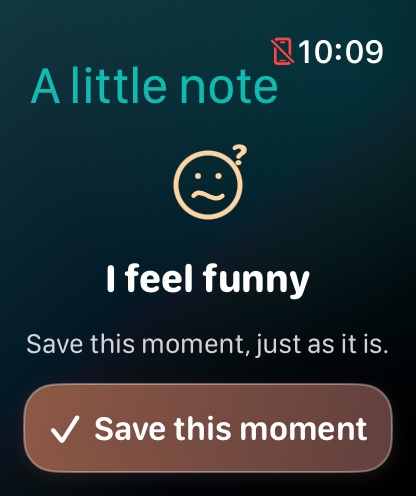
Inside the child experience, I feel funny saves a quick time marker. The solo equivalent is Notice a change.
The complication opens a dedicated screen. Tap Save this moment to save locally, or Not now to leave without a record. Tapping the watch face alone does not create a note.
A successful save confirms local storage. It does not call, message, or alert a grown-up.
Put the button on your watch face
- Update the Watch app to version 3.0, build 15 or later.
- Touch and hold your existing watch face, then choose Edit.
- Move to the complication settings and select an available slot.
- Choose Steady Meadow → I feel funny, then finish editing.
- Tap the complication and try the save screen together.
CircularA compact, familiar face icon.
CornerAn icon with a label where the face supports it.
Inline“I feel funny” in a narrow text slot.
RectangularAn icon and readable save-a-moment label.
Available slots depend on Apple’s watch face. This is an app complication, not a separately installed custom watch face. If it does not appear, check the Watch app’s installed version, reopen the app, and try the face editor again.
Saved here. Shared when reconnected.
Notes and permitted, available local Health records enter a durable queue on the Watch. They remain pending while the phone is unavailable. After reconnection, the phone saves a copy before acknowledging receipt; it then imports that saved copy into the journal.
Apple controls background transfer timing. Unlock both devices and open both apps if records are waiting. Check storage and connection, and use Retry saved watch data in phone Settings when a delivery issue is shown.
Do not uninstall an app holding records you have not transferred or exported. Pending records do not expire simply because the phone is away, but device storage is finite.
Take a short mindful pause
Swipe up on the Watch and choose Mindful pause. Select 1, 2, or 5 minutes, then Notice around me or My own breathing pace. Tap Start pause while the app is open.
Finish now ends it early. End pause & close also closes the screen. The pause can continue with your wrist lowered while the app remains frontmost; leaving the app or a system interruption can end it. There is no required pace or target.
A pause needs no Health permission and does not start a workout or change sensor sampling.
Know what Health readings can tell you
The app copies supported records already available in local Apple Health. Hardware, region, permissions, age, battery, movement, and Apple’s schedules affect availability. Readings may arrive late or contain gaps.
Steady Meadow does not provide on-demand or continuous heart-rate recording, identify why a symptom happened, or determine that a wearer is safe. Decorative characters and landscapes do not represent sensor results.